Chatbots vs. AI assistants vs. AI agents: An IT leader's guide

In this ever evolving digital landscape that the author wrote this article in, it can be hard to stay abreast of advancements in AI. Since the term 'Artificial intelligence' was coined in 1955, there have been a lot of changes but not as many in the last couple of years since the launch of ChatGPT.
With every company looking to incorporate AI in its own product offering and its employee productivity stack, it can be quite a challenge for CIOs to figure out what kind of AI offering they should integrate and for what use case. So, we at Atomicwork decided to put together a framework to help CIOs make sense of the AI landscape and the rules of thumb(s) they need to keep in mind.
The TL;DR -
Chatbots vs AI assistants vs. AI agents - At a glance:
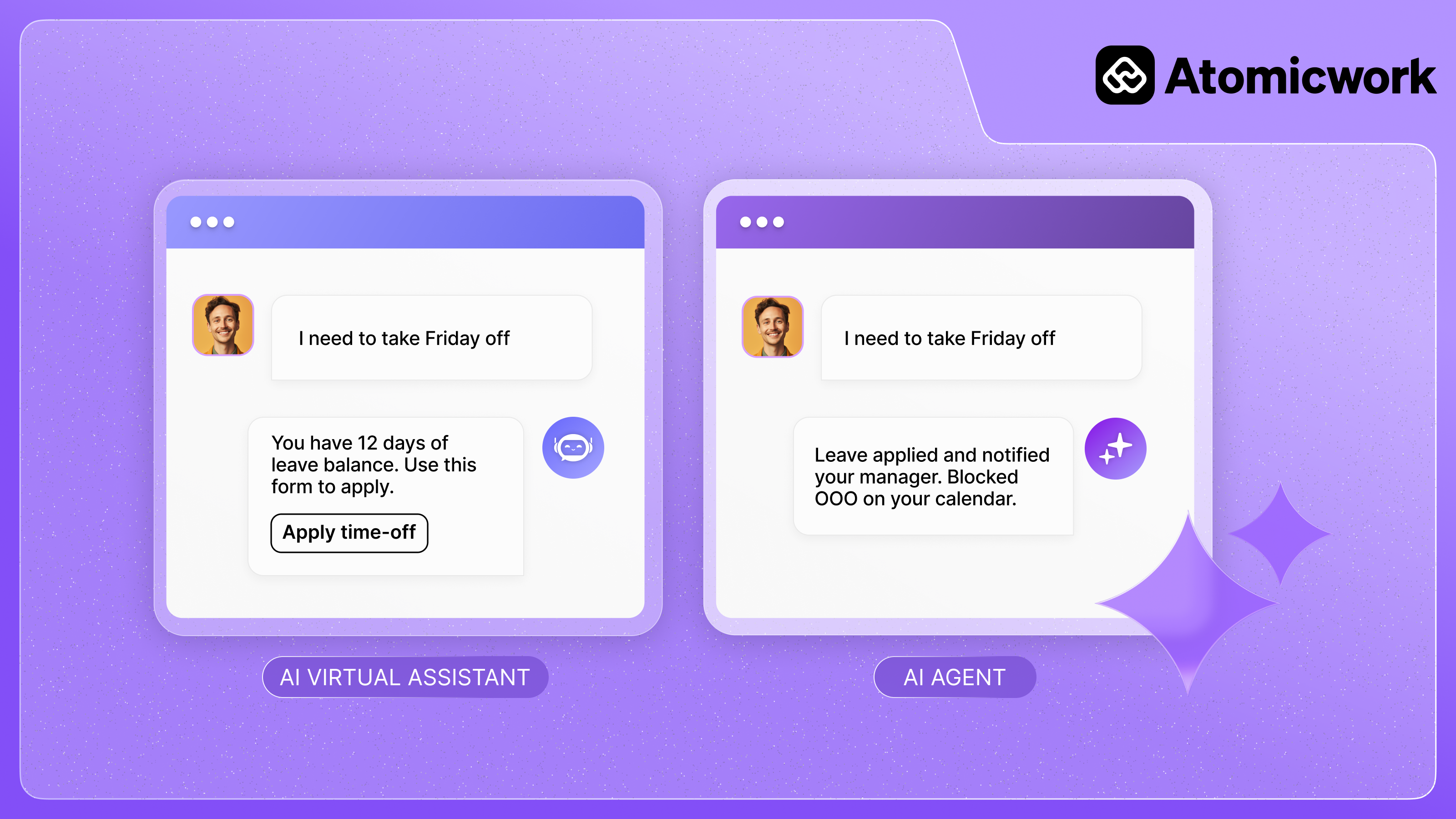
The distinction between all three comes down to two things: autonomy and the complexity of workflows they can handle.
What are chatbots?
The first chatbot, ELIZA, preceded ITIL by at least three decades but the impact of ELIZA on IT support exists till today.
Till recently, IT teams attempted to reduce repetitive tasks through automation scripts and simple text-based decision trees. By following the predefined script and the tree, chatbots can handle common queries by following a set of programmed rules, offering limited but useful automation for repetitive support tasks. This allows IT to offer support for common use cases online, through a portal, and reduced the number of people calling them up for support.
When is it useful?
Chatbots are perfect for use cases where
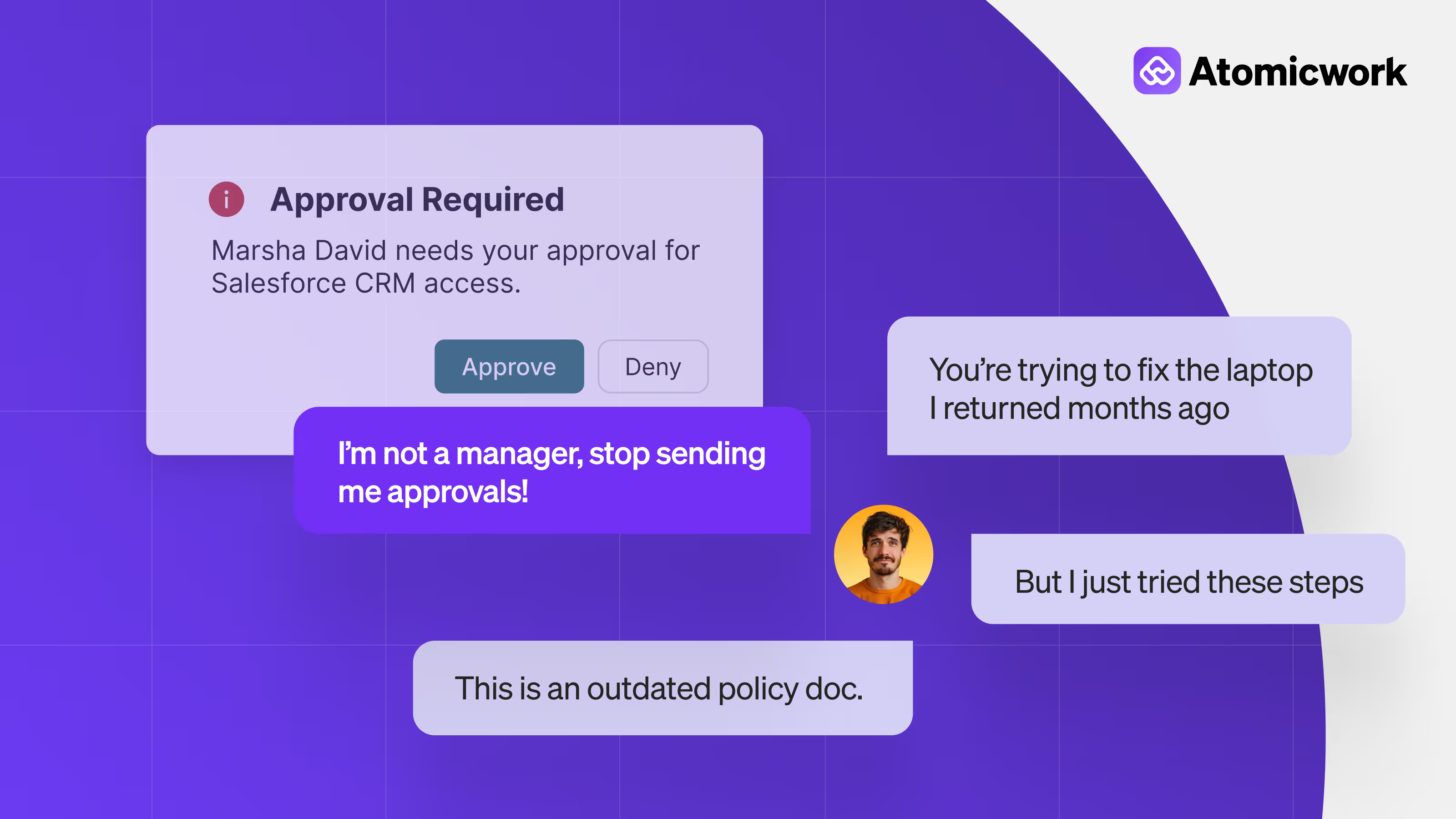
However, service desk chatbots are mostly available only through portals so you have to continuously direct your employees to the IT portal every time they have a question for you. You also have to be precise about the dialogue flow design else users would end up 'stuck' because the bot didn’t know how to proceed further. This means that you have to account not just for the terms a user might use (and all of its synonyms) but also, make the interactions feel conversational like they were happening with a human.
Allocating resources for development, deployment, and maintenance for such a project can also be a challenge, especially for smaller organizations. Your systems have to be properly integrated else the user will be forced to repeat everything they told the bot which is an unpleasant user experience.
What are AI assistants?
An AI Assistant leverages artificial intelligence to enhance user interactions, automate tasks, and provide efficient and personalized support across various domains and platforms. AI Assistants use NLP to understand user queries and generate human-like responses, enabling intuitive and seamless interactions. They can maintain context over multiple interactions, allowing for more coherent and relevant responses.
Enterprise AI Assistants can be:
- Domain agnostic like Copilot that helps employees perform various work tasks like email creation or summarization, meeting scheduling, search-and-surface from personal documents and so on.
- Domain-specific assistants help IT teams provide efficient IT support to employees. You can configure them to provide answers to frequently asked IT questions (so it’s an IT expert), guide employees through troubleshooting solutions, solve some minor issues like password resets end-to-end, and create requests on their behalf so a human agent can help them
As with most tech, AI Assistants are most effective when they are integrated with the other apps that you use so that they can leverage APIs to perform actions or pull data in other apps. For example, using Copilot to pull deal information from Salesforce so you can prepare for your meeting with a customer.
When is it useful?
- AI Assistants can be incredibly useful for IT and HR support. They can not only handle everyday queries like 'What is the leave policy?' but also more complex queries like 'What is my leave policy?' by integrating with other systems like your HRIS or your attendance software and automating multi-step workflows like not just retrieving the time-off number but also applying for time-off, securing approval and updating the status.
- AI Assistants are very much in the 'come as you are' documentation camp. You don’t have to spend a lot of time preparing your documentation for training; often enough, it’s a matter of connecting your systems, uploading your documents and just testing the Assistant. This means you don’t have to maintain and update separate data stores or spend time on specialized formats.
- Another reason that AI Assistants end up being more useful than chatbots is that they can be easily integrated into an employee’s flow of work. Instead of going to a portal every time they need help or need to look something up, an employee can just DM an AI Assistant on Slack or Teams or email and receive the assistance they need. AI Assistants bridge the support gap by taking support to the end-user.
- AI Assistants can provide incredibly personalized support. AI Assistants can tailor interactions based on user preferences, permissions, behaviors, and past interactions to provide personalized and relevant assistance. AI Assistants can also be configured to produce answers verbatim, without any generation or summarization capabilities at play - an extremely useful capability when one is working with legal documentation.
What does it take to realistically use an AI Assistant?
I firmly believe that end users who have questions and seek answers are not interested in the process of obtaining those answers. Their needs are simple: they want their questions answered immediately and accurately. The challenge for service organizations is to fulfill this need as efficiently as possible. Atomicwork recognizes this gap and has developed a product that will revolutionize the way we structure and access information, ultimately fulfilling the end user's objective. Syachfri Tjhia, Head of IT, Catalyst Education
What are AI Agents?
Gartner, tech’s Webster, defines AI Agents as “…autonomous or semiautonomous software entities that use AI techniques to perceive, make decisions, take actions and achieve goals in their digital or physical environments”.
AI agents can operate with minimal human agent intervention, making decisions based on predefined rules, learned behaviors, or real-time data. Think of them as trusted employees that you can send out on tasks with goals, roles and outcomes clearly defined.
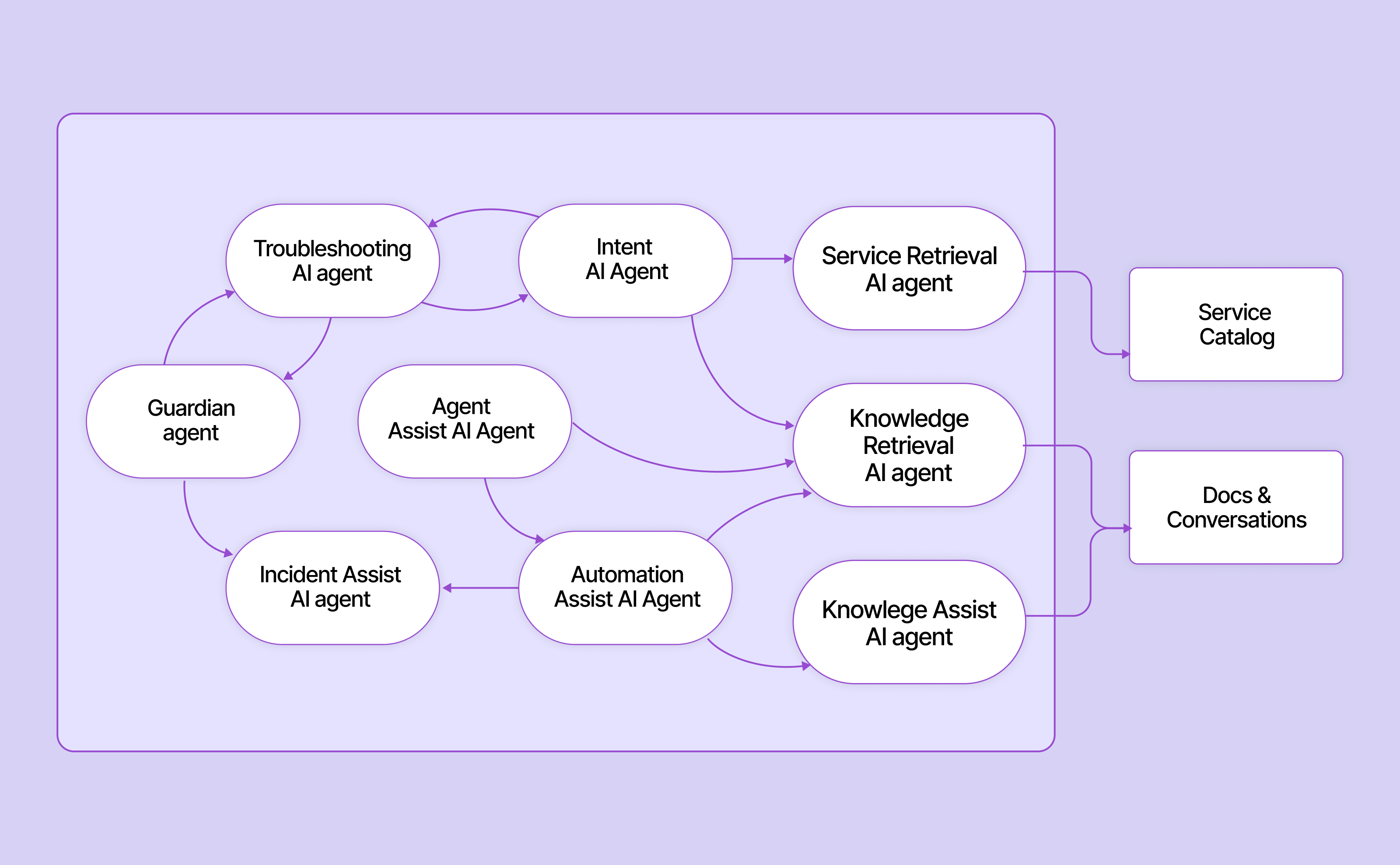
AI agents can even work in crews with one agent performing a task and turning it over to another agent for processing and performing its task. For example, an agent crew can research (”read” code), write and edit a knowledge base article all on its own without needing a human to come in at any point.
When are AI agents useful?
- AI Agents can analyze tickets in a helpdesk and suggest (and even write) documentation based on knowledge and training gaps that it observes
- AI Agents can look for workflow opportunities based on your human agents’ activities and help build workflows to admins
- AI Agents can step in to troubleshoot common and simple IT issues, if a human agent is not immediately available. For example, if an employee is having trouble with their VPN setup, an AI agent like Atom can “look” it up for the employee autonomously and suggest solutions based on its findings.
AI Agents have the potential to be the most useful tool in an IT team’s arsenal. AI Agents have such a high level of autonomy that IT teams no longer have to worry about helpdesk staffing predictions and can focus on moving up the Maslow hierarchy of IT needs. IT teams spend most of their time involved in tasks that do need human decision making or intervention so AI agents can go a long way in alleviating some of that frustration and freeing up their time for more creative work.
Related resources: 25+ Enterprise AI agent use cases
The more autonomous your AI gets, the more it needs the same governance constructs IT already runs for human employees: identity, access policies, audit trails, and clear escalation paths. Every agent needs to be governed the same way you'd govern any system with persistent access to your environment.
What comes after AI agents?
AI agent that completes tasks are soon evolving into an AI coworker that has an ongoing role, identity, and governance within your organization. Multi-agent architectures grew 327% in just four months, according to Databricks' 2026 State of AI Agents Report. Agents are ephemeral, complete their tasks, and exit. AI coworkers are persistent, with defined roles, access policies, reporting hierarchies, and lifecycle management. I'll be covering more about how and where to use AI coworkers soon in an upcoming article.
Now that you're familiar with all the latest AI tech terms, we’d recommend you think of where and which AI is most needed in IT support with this framework.
The terms chatbot, AI assistant, AI copilot, and AI agent are often used interchangeably which is what led to the creation of this article. Often enough, when a company talks AI, their offerings tend to be a mishmash of the latter three which can lead to some confusion on the buyers’ front. The distinction, however, is quite straightforward and is purely based on autonomy and its ability to handle complex multi-turn workflows.
If you need more assistance, in choosing the right type of AI technology for your enterprise use case, reach out to us!
Frequently asked questions about AI assistants vs. AI agents
1. What is the difference between an AI agent and an AI assistant?
An AI assistant responds to prompts which means you ask a question, it answers. You ask it to draft something, it drafts. The assistant waits for your input before every action. An AI agent operates autonomously toward a goal with minimal supervision. Give it an objective (resolve this ticket, provision this access, triage these incidents), and it plans the steps, executes them, and handles exceptions along the way.
2. How do AI agents work in IT service management?
AI agents in ITSM automate specific task workflows like ticket classification, password resets, software provisioning, incident routing, and first-line troubleshooting. A single agent handles one workflow end-to-end: it reads the request, gathers context from connected systems, takes action, and closes the loop with the employee. This is the architecture behind platforms like Atomicwork, where specialist agents (hardware, software, security, HR Ops) each own a domain and hand it off to each other as needed.
3. Can AI agents and assistants work together?
Yes, and the most effective enterprise deployments are built exactly this way. The assistant handles the interaction layer: it's what employees talk to when they need help. It understands the request, asks clarifying questions, searches knowledge, and provides guidance. When the request requires action (not just information), the assistant hands off to an agent. The agent executes the multi-step workflow: checking permissions, pulling data from connected systems, making changes, and confirming completion. The employee sees one seamless conversation. Behind it, the assistant understood what was needed and the agent fulfilled it.
4. How do you govern AI agents in the enterprise?
The same way you govern any system with persistent access to your environment through identity, permissions, and audit trails. Every agent needs a defined identity in your directory, scoped access policies that limit what it can reach and modify, and change management processes that control how its scope expands over time. Logging matters too: every action an agent takes should be traceable to a specific request, approval, and outcome.
5. What should a CIO look for when evaluating AI agent platforms?
Three things. First, how native the AI is to the platform's architecture — is AI built into the core, or bolted onto a legacy system? Bolted-on AI inherits the limitations of whatever it's sitting on top of. Second, how governance scales as agents multiply. Can you manage identity, permissions, and audit trails for 50 agents the same way you manage them for 5? If governance is manual and per-agent, it won't hold. Third, whether agents can actually act autonomously or only surface suggestions for humans to execute. Ask to see the workflow execution, not just the recommendation engine.


You may also like...